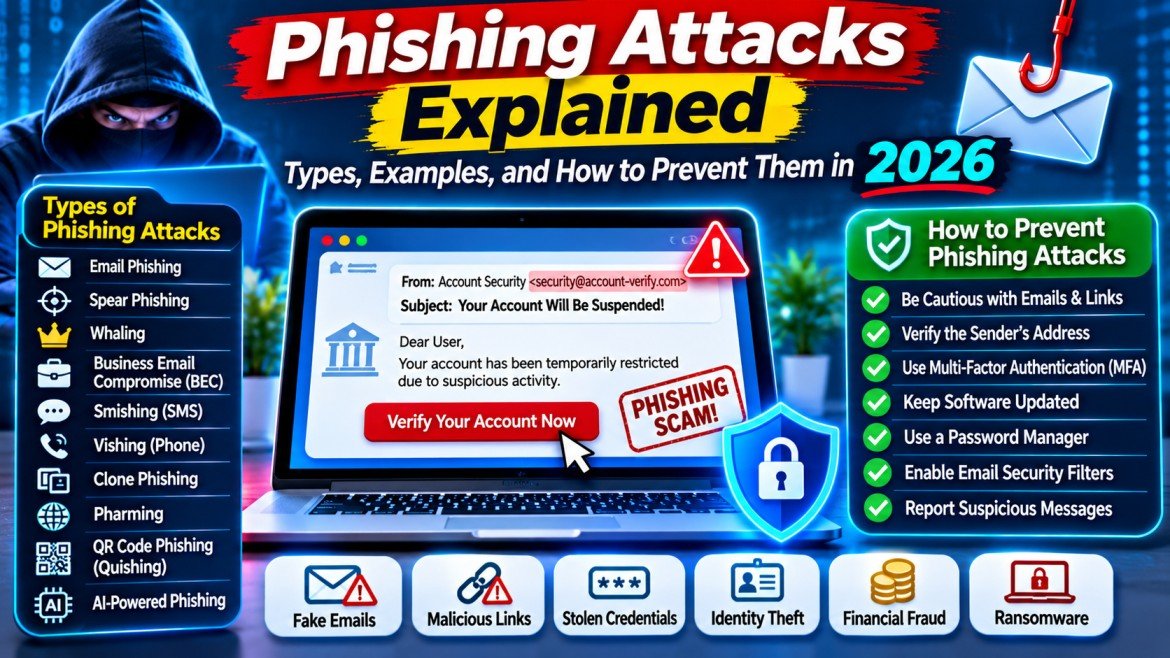
Phishing Attacks, Cybercriminals are constantly finding new ways to steal personal information, financial details, and online account credentials. One of the most common methods they use is phishing.
Phishing attacks target individuals and businesses through deceptive emails, text messages, phone calls, social media messages, and fake websites. Attackers often pretend to represent trusted organizations, banks, technology companies, or even someone you know.
Their goal is to convince you to click a malicious link, download an infected attachment, share sensitive information, or approve an unauthorized transaction.
As digital communication continues to grow, understanding how phishing works has become an essential part of cybersecurity.
In this guide, you will learn what phishing attacks are, how they work, the different types of phishing scams, real-world examples, warning signs, and practical ways to protect yourself and your business in 2026.
What Are Phishing Attacks?
Phishing Attacks, Phishing is a type of cyberattack in which criminals use deceptive communication to trick people into revealing confidential information or performing an unsafe action.
Attackers commonly impersonate trusted organizations, such as banks, online retailers, payment services, employers, and government agencies.
For example, you might receive an email that appears to come from your bank. It may claim that your account has been temporarily restricted and ask you to verify your login information through a link.
The link may lead to a fake website designed to look like the real banking platform. If you enter your credentials, the attacker may capture them.
Phishing attacks can target:
- Email account passwords.
- Banking and payment information.
- Credit card details.
- Social Security numbers.
- Business login credentials.
- Personal identification information.
- Confidential company documents.
Phishing is a form of social engineering because it exploits human trust, curiosity, fear, and urgency rather than relying only on technical vulnerabilities.
How Do Phishing Attacks Work?
Phishing attacks generally follow a series of steps designed to convince victims to take an action that benefits the attacker.
Step 1: Choosing a Target
Phishing Attacks, Attackers may target random internet users or select specific individuals and organizations.
For example, a cybercriminal might target employees of a company because their accounts provide access to internal systems.
Step 2: Creating a Fake Message
The attacker prepares a deceptive email, text message, Phishing Attacks, phone call, or social media communication.
The message may imitate a trusted company, service provider, colleague, or government organization.
Step 3: Creating a Sense of Urgency
Phishing messages often encourage victims to act quickly.
Common examples include:
- Your account will be suspended.
- Your payment has failed.
- Your package could not be delivered.
- Your password needs immediate verification.
- Your business account has been restricted.
The purpose is to prevent the recipient from carefully checking the message.
Step 4: Sending a Malicious Link or Attachment
The message may contain a link to a fake website or an attachment that contains malicious content.
Some attackers use QR codes or shortened URLs to make suspicious destinations harder to recognize.
Step 5: Stealing Information or Installing Malware
If the victim enters their credentials on a fake website, Phishing Attacks, the attacker may capture the information.
In other cases, opening a malicious attachment or downloading a file may expose the device to malware.
Step 6: Misusing the Stolen Information
Attackers may use stolen credentials to access email accounts, financial services, business applications, or other online systems.
They may also attempt identity theft, financial fraud, or further attacks against the victim’s contacts.
10 Common Types of Phishing Attacks in 2026
Phishing is not limited to traditional email scams. Attackers use different communication channels and techniques to reach potential victims.
Here are ten common types.
1. Email Phishing
Email phishing is one of the most recognizable forms of phishing.
Attackers send deceptive emails that appear to come from legitimate organizations or companies.
A typical email might claim that an online account needs verification or that an unexpected payment requires immediate attention.
The message may contain a malicious link or an infected attachment.
Example:
A person receives an email that appears to come from an online payment service. It says that unusual activity has been detected and asks the recipient to verify their account.
The included link leads to a fake login page designed to collect credentials.
How to prevent it:
- Check the complete sender email address.
- Avoid unexpected attachments.
- Do not enter passwords through suspicious links.
- Visit the company’s official website directly.
- Report suspicious emails.
2. Spear Phishing
Spear phishing is a targeted phishing attack designed for a specific individual or organization.
Unlike generic phishing messages, spear phishing often includes personal or professional information to make the communication appear more believable.
Attackers may research a person’s job title, company, colleagues, or business activities before creating the message.
Example:
An employee receives an email that appears to come from their manager. The message refers to a current project and requests an urgent document containing confidential information.
Because the message includes familiar details, the employee may be more likely to trust it.
How to prevent it:
- Verify unusual requests through another communication channel.
- Avoid sharing confidential information without authorization.
- Use MFA on business accounts.
- Train employees to recognize impersonation attempts.
3. Whaling Attacks
Whaling is a targeted phishing technique that focuses on senior executives and other high-value individuals.
Attackers may target CEOs, CFOs, business owners, directors, and senior managers because these individuals often have access to financial systems and sensitive company information.
Example:
A company executive receives a message that appears to come from a legal department requesting an urgent review of confidential business documents.
The message may contain a malicious attachment or direct the executive to a fake login page.
How to prevent it:
- Verify sensitive financial and administrative requests.
- Use approval procedures for important transactions.
- Enable strong authentication.
- Provide cybersecurity training for executives.
4. Business Email Compromise (BEC)
Business Email Compromise is a form of cyber-enabled fraud in which attackers impersonate or compromise legitimate business email accounts to manipulate employees into transferring money or sharing sensitive information.
BEC attacks may involve fake invoices, fraudulent payment instructions, or impersonation of executives and suppliers.
Example:
An employee in the finance department receives an email that appears to come from a regular supplier. It requests that future payments be sent to a different bank account.
If the employee does not independently verify the change, company funds may be transferred to the attacker.
How to prevent it:
- Verify bank account changes through known contact details.
- Require approval for large payments.
- Protect business email with MFA.
- Use email authentication technologies such as SPF, DKIM, and DMARC.
- Establish clear financial verification procedures.
5. Smishing (SMS Phishing)
Smishing is phishing conducted through text messages or SMS.
Attackers may send messages pretending to represent banks, delivery companies, government services, or online platforms.
These messages often include suspicious links or requests for personal information.
Example:
A person receives a text message claiming that a delivery cannot be completed until a small fee is paid.
The message contains a link to a fake payment page.
How to prevent it:
- Avoid clicking unexpected text-message links.
- Check delivery information through the official company application.
- Never share verification codes with unknown contacts.
- Block and report suspicious numbers.
6. Vishing (Voice Phishing)
Vishing is a phishing technique conducted through telephone calls or voice communication.
Attackers may pretend to be bank employees, technical support representatives, government officials, or company administrators.
They may use threats or urgent claims to convince victims to reveal sensitive information.
Example:
Someone receives a phone call from a person claiming to represent their bank. The caller says suspicious activity has been detected and asks for an account verification code.
Sharing that code could allow the attacker to access the account.
How to prevent it:
- Never share passwords or one-time verification codes.
- End suspicious calls.
- Contact the organization using its official phone number.
- Be cautious of callers demanding immediate payment.
7. Clone Phishing
Clone phishing involves creating a copy of a legitimate message and replacing its original link or attachment with a malicious version.
The copied message may look familiar because it resembles a communication the recipient has previously received.
Example:
An employee receives a message that looks like a previously shared business document. It claims that an updated version is available.
The new attachment contains malicious content.
How to prevent it:
- Verify unexpected replacement documents.
- Confirm unusual requests with the original sender.
- Use updated endpoint security software.
- Avoid opening unexpected attachments.
8. Pharming
Pharming is an attack technique that redirects users to fraudulent websites, even when they intend to visit a legitimate destination.
It may involve manipulating DNS settings or compromising a device or network.
Example:
A user attempts to visit a familiar website but is redirected to a fraudulent page designed to collect login credentials.
How to prevent it:
- Keep devices and routers updated.
- Use trusted DNS services.
- Avoid installing unknown software.
- Use MFA and phishing-resistant authentication where available.
- Contact your hosting or network provider if suspicious redirects occur.
9. QR Code Phishing (Quishing)
QR code phishing, sometimes called quishing, uses malicious QR codes to direct victims to fraudulent websites.
Attackers may place fake QR codes in emails, printed notices, posters, or messages.
Because the destination is not immediately visible, people may scan the code without checking where it leads.
Example:
An employee receives a message containing a QR code that supposedly provides access to a company document.
Scanning it opens a fake sign-in page that attempts to collect the employee’s credentials.
How to prevent it:
- Check the destination URL before opening it.
- Avoid scanning QR codes from unknown sources.
- Do not enter credentials on unexpected pages.
- Access business applications through trusted bookmarks or official apps.
10. AI-Powered Phishing
Artificial intelligence can help attackers create convincing phishing messages, imitate communication styles, and automate parts of their campaigns.
AI-generated messages may contain fewer spelling errors and more personalized language than traditional phishing emails.
Attackers may also misuse synthetic audio or video to impersonate familiar individuals.
Example:
An employee receives an urgent voice message that appears to come from a senior manager requesting an immediate payment.
The employee should verify the request through an independent, trusted communication channel before taking action.
How to prevent it:
- Verify unusual requests independently.
- Establish payment approval procedures.
- Use phishing-resistant authentication.
- Train employees about AI-assisted impersonation.
- Never rely on voice or video alone to confirm sensitive requests.
Real-World Phishing Attack Examples
Understanding realistic scenarios can help individuals and businesses recognize phishing attempts.
The following examples are illustrative scenarios based on common phishing techniques.
Example 1: Fake Bank Security Alert
A person receives an email claiming that their bank account has been temporarily restricted.
The email asks them to click a link and verify their identity.
The link opens a fraudulent login page that imitates the bank’s website.
Warning sign: The message demands immediate action and uses an unfamiliar web address.
Example 2: Fake Package Delivery Message
A customer receives a text message claiming that their package is waiting for delivery confirmation.
The message requests a small payment through an included link.
The payment page is fraudulent and attempts to collect card information.
Warning sign: An unexpected payment request and an unfamiliar website.
Example 3: Fake Microsoft 365 Login
An employee receives an email claiming that their work account will expire unless they sign in again.
The included link opens a fake Microsoft sign-in page.
The attacker attempts to capture the employee’s business credentials.
Warning sign: A login request through an unexpected link.
Example 4: Fake Executive Payment Request
A finance employee receives an urgent email that appears to come from the company’s CFO.
The message requests an immediate wire transfer to a new account.
Warning sign: An unusual payment request combined with pressure to act quickly.
How to Identify a Phishing Email or Message
Recognizing suspicious communication is one of the most important ways to prevent phishing attacks.
Look for these warning signs.
1. Suspicious Sender Address
Check the complete email address rather than relying only on the sender’s display name.
Attackers may use addresses that look similar to legitimate company domains.
2. Urgent or Threatening Language
Messages that demand immediate action should be treated carefully.
Examples include account suspension warnings, urgent payment requests, and threats of losing access.
3. Unexpected Links
Hover over links on desktop devices to inspect their destination before opening them.
On mobile devices, use the available link-preview feature or navigate to the official website independently.
4. Unexpected Attachments
Be cautious with unexpected files, particularly executable files, archives, and documents requesting unusual permissions or enabling macros.
5. Requests for Sensitive Information
Treat unexpected requests for passwords, verification codes, financial information, or personal identification details as suspicious.
6. Unusual Payment Instructions
Requests to change bank details, purchase gift cards, or make urgent transfers should always be independently verified.
7. Messages That Do Not Match Normal Communication
An unusual tone, unexpected request, or unfamiliar communication method may indicate impersonation.
However, modern phishing messages can be professionally written, so grammar and spelling alone are not reliable indicators.
Best Ways to Prevent Phishing Attacks in 2026
Protecting yourself from phishing requires a combination of safe online behavior, account security, and appropriate cybersecurity tools.
1. Enable Multi-Factor Authentication
MFA adds an additional verification step when signing in to an account.
Even if an attacker obtains a password, additional authentication can make unauthorized access more difficult.
Where supported, prefer phishing-resistant methods such as passkeys or hardware security keys.
2. Use a Password Manager
A password manager helps generate and store unique passwords for different accounts.
This reduces the risk of password reuse across websites and services.
Many password managers can also help identify suspicious login domains by refusing to autofill credentials on websites that do not match the saved address.
3. Avoid Clicking Suspicious Links
Do not click unexpected links in emails, messages, or social media communications.
Instead, open the official website or application directly and check whether the notification is genuine.
4. Keep Software Updated
Update your operating system, browser, email application, and security software regularly.
Software updates often include important security fixes.
5. Use Email Security Filters
Email filtering technologies can help detect suspicious messages, malicious attachments, and deceptive links before they reach users.
Businesses should also consider email authentication technologies such as SPF, DKIM, and DMARC.
6. Verify Sensitive Requests
If someone asks for money, passwords, confidential files, or account access, verify the request through a separate trusted communication channel.
For example, call the person using a known phone number instead of replying to the suspicious message.
7. Use Reliable Antivirus and Endpoint Protection
Security software can help detect malicious downloads and suspicious files.
Businesses may also use endpoint detection and response solutions to investigate unusual device activity.
8. Learn About New Phishing Techniques
Phishing methods continue to evolve.
Employees and individuals should understand common scams involving email, text messages, phone calls, QR codes, and AI-generated impersonation.
9. Back Up Important Information
Maintain regular backups of important files and business information.
Backups can help recover data if a phishing attack leads to ransomware or other malware infections.
10. Report Suspicious Messages
Report phishing attempts to your email provider, workplace IT department, or the relevant authorities.
Avoid forwarding suspicious links to other people without warning them.
Best Phishing Protection Tools in 2026
Different security tools can help reduce phishing risks. Some protect email accounts, while others secure devices, browsers, and user credentials.
| Tool | Main Purpose | Suitable For |
|---|---|---|
| Microsoft Defender for Office 365 | Email and collaboration protection | Microsoft 365 businesses |
| Google Workspace Security | Email and account protection | Google Workspace users |
| Proofpoint | Email threat protection | Businesses and enterprises |
| Mimecast | Email security and phishing protection | Organizations |
| Cloudflare | Web traffic and DNS protection | Websites and businesses |
| Bitdefender | Malware and endpoint protection | Individuals and businesses |
| 1Password | Password management | Individuals and teams |
These products offer different features and should not be treated as interchangeable phishing solutions.
Before choosing a product, review its current capabilities, pricing, compatibility, and security requirements.
What Should You Do If You Click a Phishing Link?
If you accidentally click a phishing link, do not panic. Take immediate steps to reduce the possible damage.
Step 1: Stop Interacting With the Website
Close the suspicious page. Do not enter passwords, payment information, or verification codes.
Step 2: Change Compromised Passwords
If you entered your password, change it immediately using the official website or application.
If the password was reused elsewhere, update those accounts too.
Step 3: Enable or Review MFA
Enable multi-factor authentication and review existing authentication methods.
Remove any unfamiliar devices or authentication methods from your account.
Step 4: Contact Your Bank if Financial Details Were Shared
If you entered payment or banking information, contact your financial institution using its official phone number.
Ask about blocking cards, reversing unauthorized transactions, and securing your account.
Step 5: Scan Your Device
Run an updated security scan if you downloaded a file or suspect malware may have been installed.
For business devices, notify your IT or security team immediately.
Step 6: Review Account Activity
Check recent login history, account recovery settings, forwarding rules, connected applications, and suspicious transactions.
Step 7: Report the Incident
Report the incident to the relevant service provider and appropriate authorities.
In the United States, phishing and fraud can be reported through the Federal Trade Commission at ReportFraud.ftc.gov. Cybercrime incidents can also be reported to the FBI’s Internet Crime Complaint Center at IC3.gov.
How Businesses Can Protect Employees From Phishing
Businesses need more than individual awareness to reduce phishing risks.
A strong organizational approach should combine technical security controls, employee training, and clear procedures.
Conduct Regular Security Awareness Training
Teach employees how to recognize suspicious emails, fake login pages, unusual payment requests, and impersonation attempts.
Use Email Authentication
Configure SPF, DKIM, and DMARC to help protect the organization’s email domain against spoofing and unauthorized email use.
Deploy Advanced Email Security
Use email filtering and threat detection to identify malicious messages, attachments, and links.
Apply Least-Privilege Access
Employees should receive only the permissions necessary for their roles.
This can reduce the impact of compromised accounts.
Establish Payment Verification Procedures
Require independent verification for changes to supplier bank details and unusual financial requests.
Create an Incident Reporting Process
Employees should know exactly how to report suspicious messages and accidental clicks.
website:: https://www.nist.gov/itl/smallbusinesscyber/guidance-topic/phishing?utm_source
Use Phishing-Resistant Authentication
Where possible, deploy passkeys or hardware security keys for accounts with access to sensitive business systems.
Frequently Asked Questions (FAQs)
1. What is a phishing attack in simple words?
A phishing attack is a scam in which criminals pretend to be trustworthy people or organizations to trick someone into sharing private information, clicking malicious links, or downloading harmful files.
2. What are the most common types of phishing?
Common types include email phishing, spear phishing, whaling, business email compromise, smishing, vishing, clone phishing, pharming, QR code phishing, and AI-assisted phishing.
3. How can I recognize a phishing email?
Look for suspicious sender addresses, unexpected links, urgent requests, unfamiliar attachments, unusual payment instructions, and requests for sensitive information. Always verify important requests independently.
4. Can phishing happen through text messages?
Yes. Smishing uses text messages to trick people into visiting fraudulent websites, sharing personal information, or making unauthorized payments.
5. What is the difference between phishing and spear phishing?
Phishing often targets many people with similar messages. Spear phishing is more targeted and uses information about a particular individual or organization to make the attack convincing.
6. Can AI create phishing emails?
Yes. Attackers can misuse AI tools to generate convincing messages, personalize scams, and imitate communication styles. AI-generated content can make phishing attempts harder to identify through spelling and grammar alone.
7. Does antivirus software prevent phishing attacks?
Antivirus software can help detect malicious files and some harmful activity, but it cannot prevent every phishing attempt. Safe browsing, MFA, email filtering, and user awareness are also important.
8. What should I do if I share my password with a phishing website?
Immediately change the compromised password through the official service, update any accounts using the same password, enable MFA, review account activity, and contact the service provider if you notice unauthorized access.
9. Are phishing attacks illegal?
Phishing conducted to steal credentials, commit fraud, or gain unauthorized access can violate criminal laws. The specific legal consequences depend on the conduct and applicable jurisdiction.
Conclusion
Phishing attacks remain an important cybersecurity risk for individuals and businesses in 2026. Criminals use deceptive emails, text messages, phone calls, fake websites, and increasingly convincing impersonation techniques to steal sensitive information.
Understanding the different types of phishing attacks makes it easier to recognize suspicious communication and avoid common mistakes.
The most effective protection combines strong authentication, unique passwords, reliable security software, regular updates, email filtering, and employee awareness.
Always verify unexpected requests for money or sensitive information through a trusted communication channel. Avoid clicking suspicious links, and report messages that appear fraudulent.
Remember: Think before you click. A few seconds of verification can protect your accounts, money, and personal information.
contact us:: https://techisshere.com/page/3/